Bug report #14474

Processing menu icons don't scale on HiDPI
| Status: | Closed | ||
|---|---|---|---|
| Priority: | Normal | ||
| Assignee: |  Victor Olaya Victor Olaya | ||
| Category: | Processing/GUI | ||
| Affected QGIS version: | master | Regression?: | No |
| Operating System: | Easy fix?: | No | |
| Pull Request or Patch supplied: | No | Resolution: | |
| Crashes QGIS or corrupts data: | No | Copied to github as #: | 22452 |
Description
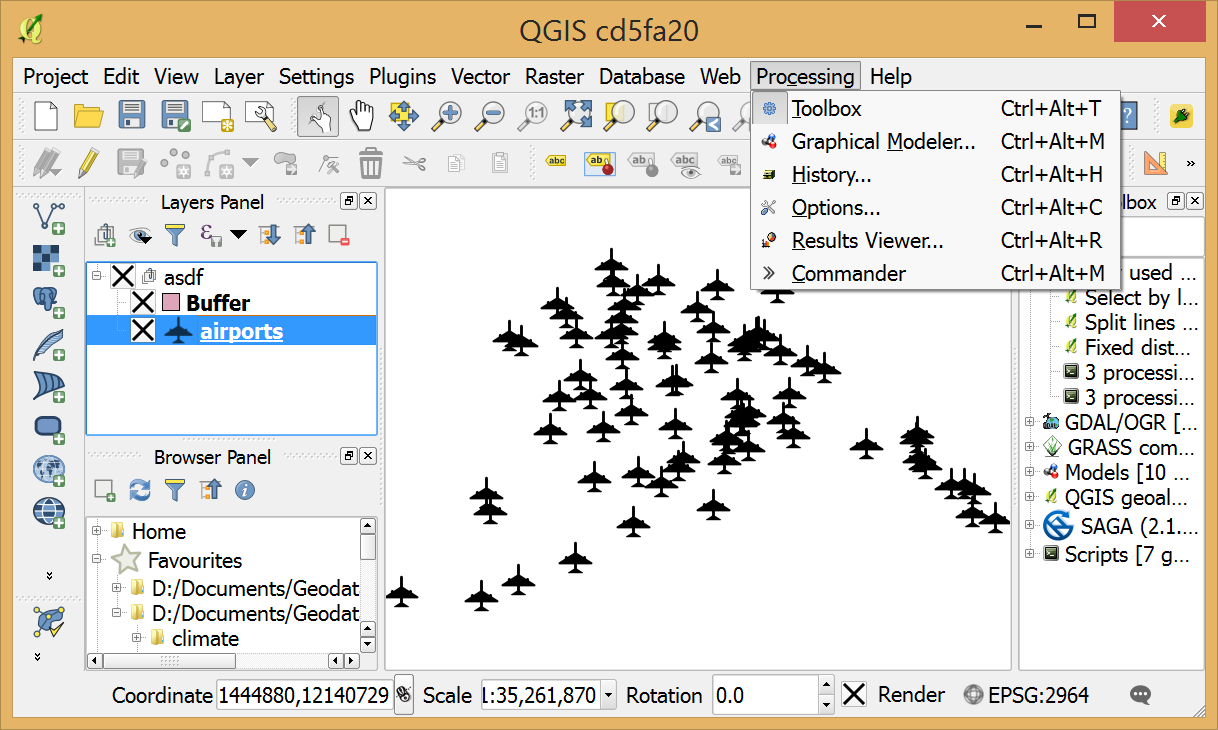
In all other menus, the icons scale and are displayed bigger on HiDPI screens but the Processing menu icons remain tiny:
Related issues
Associated revisions
[processing] replace some raster icons with SVG to improve HiDPI support (refs #14474)
[processing] replace some raster icons with SVG to improve HiDPI support (refs #14474)
[processing] more HiDPI fixes (refs #14474)
[processing] more HiDPI fixes (refs #14474)
[processing] vectorize and improve menu icons (fixes #14474)
History
#1
 Updated by Alexander Bruy over 10 years ago
Processing icons are rasters with small size (16x16). Also they does not fit well into main QGIS iconset, we definitely need new icons preferably in SVG format.
#2
 Updated by Anita Graser over 10 years ago
Sent out a call to the UX list http://osgeo-org.1560.x6.nabble.com/Processing-needs-SVG-icons-tc5257456.html
#3
Updated by Alexander Bruy over 10 years ago
I replaced some provider icons with SVG in 660bb27388. Hope this helps with some toolbox icons (QGIS, GDAL, GRASS, R)
#4
Updated by Alexander Bruy over 10 years ago
- Status changed from Open to In Progress
#5
 Updated by Mathieu Pellerin - nIRV almost 10 years ago
- Status changed from In Progress to Closed
Fixed in changeset 00ee2ad9899bf3df48e1ccd7f02b55e803e0c92e.